The centralized Staffing Broadcast Google Sheet provided organization, but required a high degree of manual entry for tracking candidate decisions.
The key transformation was integrating Sheets data with third-party APIs via Apps Script. This enabled us to cut out the most time-consuming operations. We no longer had to flip between applications to message candidates, wait for their replies, and then manually track responses.
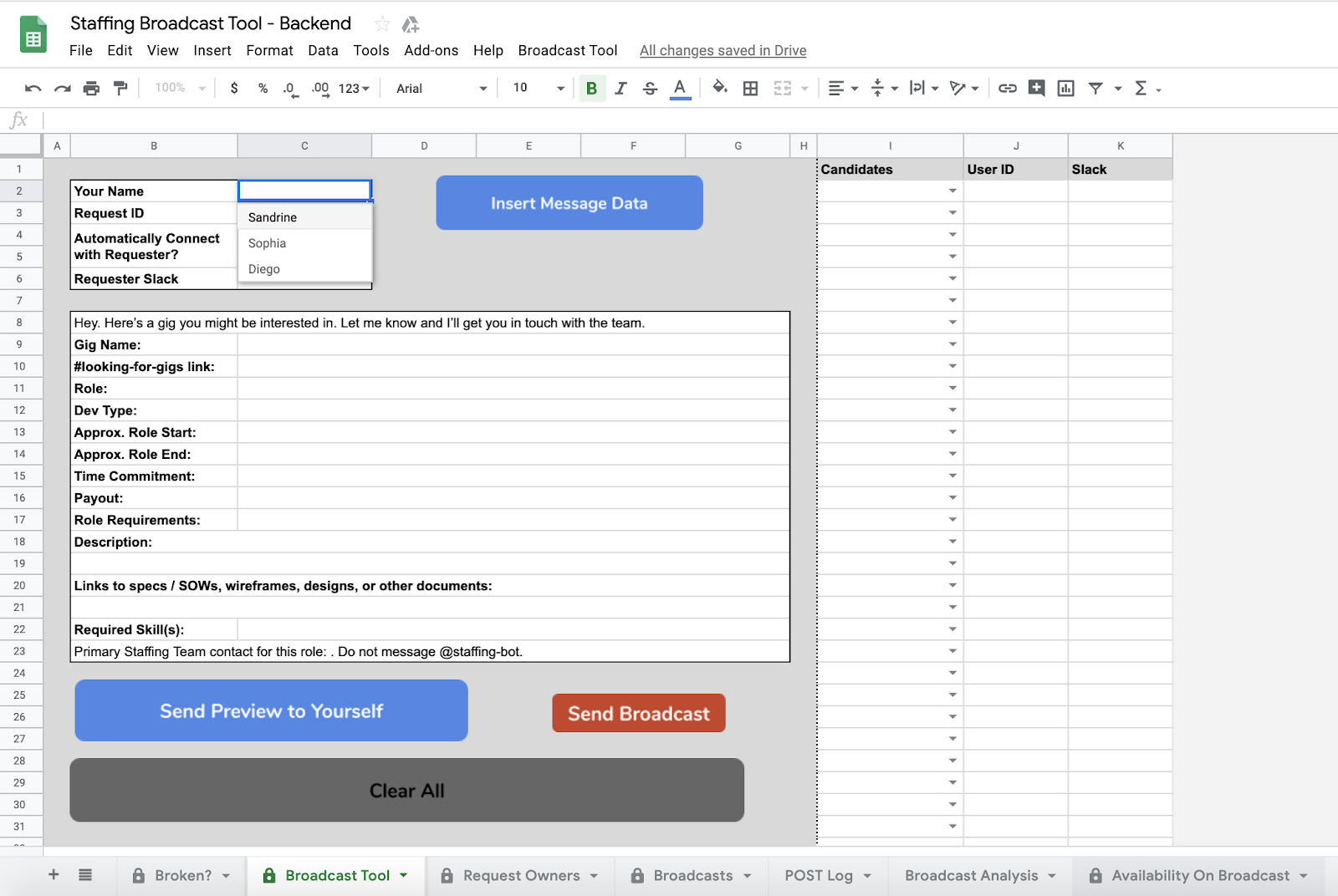
To interact with these APIs, we built a user interface directly into the Staffing Broadcast Google Sheet. By introducing an information module, as well as drop-down lists and buttons, we were able to define a small set of manual actions versus the much wider list of tasks the tool would perform automatically across multiple applications.
By integrating Google Apps Script with third-party APIs and creating a user interface, we evolved the Staffing Broadcast Tool to centralize and automate almost every step of the staffing process.
doPost() is the key function in our staffing tool that facilitates third-party services triggering our Apps Script automations. Below is a snippet of how we listened to candidates’ responses from a third-party messaging application. In this case, queueing the third-party message in a Google Sheet so it can be processed with improved error-handling.
/**
 * Receive POST requests and record to queue.
 */
doPost(e) {
  var payload = e.postData.contents;
  SpreadsheetApp.openById(SPREADSHEET_ID)
    .getSheetByName("Unprocessed")
    .appendRow([payload]);
  return ContentService.createTextOutput(""); // Return 200
}
Almost all manual work associated with finding candidates was automated through the combination of integrations with third-party APIs and having a user interface to perform a small, defined set of actions. Our team’s day-to-day became shockingly simple: select candidates to receive messages within the Staffing Broadcast Tool, then click the “Send Broadcast” button. That’s it. The tool handled everything else.
Leveraging Sheets as our foundation, we fundamentally transformed our spreadsheet into a custom software application. The spreadsheet went from a partially automated datastore to a tool that provided an end-to-end automated solution, requiring only the click of a few buttons to execute.
Evolution into a standalone application
While satisfied, we understood that having our application live in Google Sheets had its limitations, namely, it was difficult for multiple team members to simultaneously use the tool. Using doGet(), the sibling to doPost(), we began building an HTML frontend to the Staffing Broadcast Tool. In addition to resolving difficulties related to multiple users being in a spreadsheet, it also allowed us to build an easier-to-use and more responsive tool by leveraging Bootstrap & jQuery.
Having multiple users in a single Google Sheet can create conflicts, but Apps Script allowed us to build a responsive web app leveraging common libraries like Bootstrap & jQuery that eliminated those problems while providing an improved user experience.
When other teams at Gigster got wind of what we built, it was easy to grant access to others beyond the Staffing Operations Team. Since Apps Script is part of the G Suite developer ecosystem, we relied on Google’s security policies to help deploy our tools to larger audiences.
While this can be done through Google’s conventional sharing tools, it can also be done with built-in Apps Script functions like Session.getActiveUser() that allow us to restrict access to specific Google users. In our case, those within our organization plus a few select users.
To this day, we continue to use this third version of the Staffing Broadcast Tool in our daily operations as it supports 100% of all client projects at Gigster.
Conclusion
By fundamentally transforming the Staffing Broadcast Tool with Apps Script, Gigster’s Staffing Operations Team increased its efficiency while supporting the growth of our company. Inspired by these business benefits, we applied this application-building approach using Apps Script for multiple tools, including candidate searching, new user onboarding, and countless automations.
Our team’s psychological shift about how we view what we are capable of, especially as a non-engineering team, has been the most valuable part of this journey. By leveraging an already familiar ecosystem to build our own software, we have freed team members to become more self-sufficient and valuable to our customers.
To get started on your Apps Script journey, we recommend you check out the Apps Script Fundamentals playlist and the official documentation. And if you’re a freelancer looking to build software applications for clients, we’re always looking for talented software engineers, product managers or designers to join Gigster’s Talent Network.
Thank you to Sandrine Bitton, the third member of the Staffing Operations Team, for all her help in the development of the Staffing Broadcast Tool.
Source: Evolving automations into applications using Apps Script